Repair Orders
RO checkout and handing back the vehicle
Close out a finished repair order, take payment, and hand back the keys with a clean record on both sides.
Checkout is the last and most-watched step of the visit. It is where the work becomes revenue and where the customer forms their final impression. Done well, it is fast, clear, and leaves a clean paper trail. Here is how to close out an RO in Pista.
Before you check out
A smooth checkout starts before the customer walks in. Confirm:
- Every authorized job is complete and the RO is on the Ready status.
- All parts used are on the RO so the invoice is accurate.
- Labor, fees, and tax look right in the totals.
- Any inspection findings the customer should see are attached.
Review the invoice with the customer
- Open the RO and click Checkout.
- Walk the customer through the invoice: the jobs done, the parts, the labor, and the total.
- Point out any declined work so it is on record that you offered it. This protects the shop and plants the seed for the next visit.
Tip: The customer remembers the conversation, not the line items. Lead with what you fixed and why it mattered, then let the clear invoice back you up.
Take payment
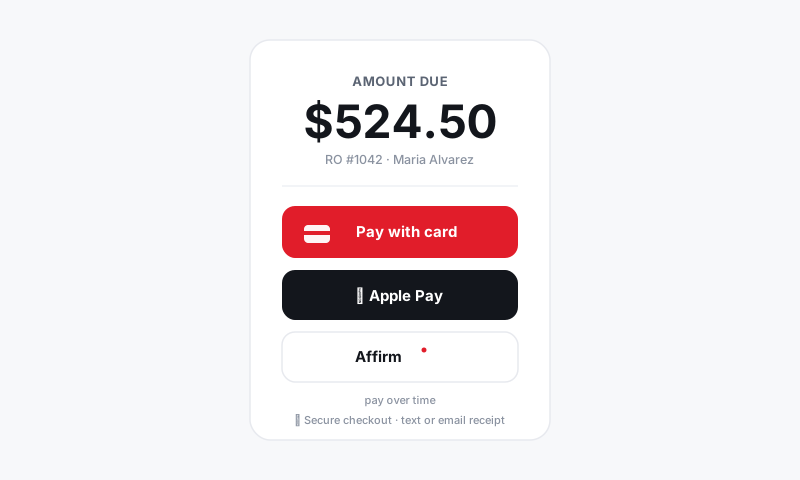
- Choose a payment method. Pista takes card, Apple Pay, Cash App, and pay-over-time options like Affirm, Klarna, and Sunbit, plus cash.
- Run the payment. The RO marks Paid and the deposit reconciles automatically.
- For pay-over-time, the customer is approved on the spot and you are paid in full. See Payments.
Good to know: Offering pay-over-time at the counter is the difference between a customer doing all the work today and deferring half of it. Surface it on bigger tickets.
Hand back the vehicle
- Send the invoice and receipt by text or email straight from the RO.
- Move the RO to Picked Up to close the job and clear the card off the board.
- Hand over the keys.
After checkout
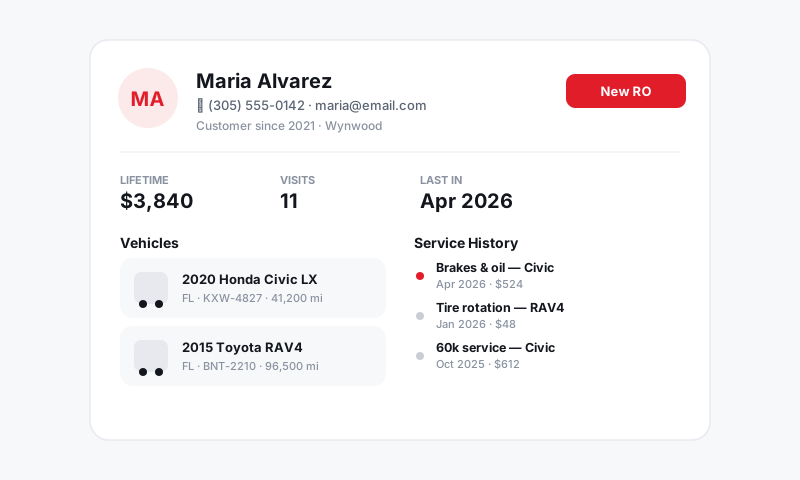
- The completed RO lives in the customer's history, so next visit you see exactly what was done and when. See Customers and CRM.
- Closed ROs roll into your sales and gross-profit reports. See Reports.
- A paid, picked-up RO is locked from accidental edits. If you genuinely need to change a closed ticket, an owner can reopen it.
That is the full loop: check in, build, approve, repair, and hand back, all on one repair order.
Still have a question about ro checkout and handing back the vehicle?
Contact support