Repair Orders
Quick RO: tag or VIN to ticket in seconds
Spin up a repair order at the curb by scanning a VIN or plate, so the car is on the board before the keys hit the hook.
Drop-off rush does not wait for data entry. Quick RO gets a vehicle onto the board in seconds with nothing but a VIN or a plate, then lets you fill in the rest once the customer has driven off. Use it any time speed matters more than completeness up front.
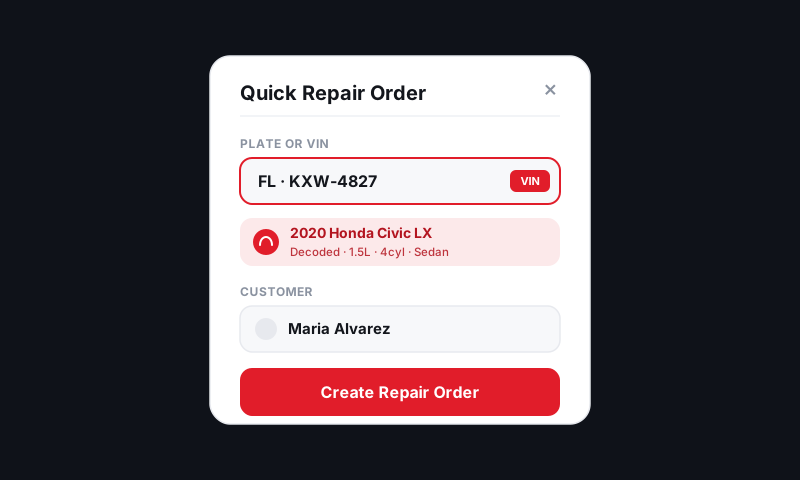
Start a Quick RO
- From the Job Board, tap New Repair Order, then Quick RO.
- Choose how you want to identify the vehicle:
- Scan VIN with your phone camera (most accurate)
- Type the plate for a state lookup
- Type the VIN by hand
- Add the customer concern in a sentence, or tap the microphone to dictate it while you walk the car.
- Tap Create. The RO is live on the board immediately.
That is the whole drop-off. Everything else can wait.
Scanning a VIN on mobile
The fastest path is the camera. Point your phone at the VIN plate on the dash or door jamb.
- The scanner reads the 17-character VIN and decodes year, make, model, and engine.
- Confirm the decode looks right, then tap Use this vehicle.
Tip: VIN plates on the lower windshield catch glare. The door-jamb sticker is usually a cleaner read. If a character won't scan, you can type the last few digits to finish.
What gets filled in automatically
A Quick RO is not a stub. From the VIN alone, Pista pre-loads:
- The decoded vehicle so MOTOR labor times and parts fitment are ready
- Open recalls flagged on the vehicle, if any
- The matching customer, if this VIN has been in before
Finish the RO when you have a minute
Once the curb clears, open the RO and complete it:
- Confirm or add the customer details, especially a mobile number for texting.
- Set the promised time. See Setting the promised time.
- Build the jobs. See Adding services, labor, and parts.
Good to know
- Same vehicle already in the shop? Pista warns you before creating a second ticket so you do not split one visit across two ROs. See Duplicate-RO guard: add to existing vs new.
- A Quick RO lands in your first workflow status (usually Inspection or Estimate) just like any other RO, so nothing falls through the cracks.
- Returning customer with a known VIN? The whole thing can take under ten seconds.
Still have a question about quick ro: tag or vin to ticket in seconds?
Contact support