Pricing and Markups
Parts markup matrices explained
Understand how a parts markup matrix works in Pista so cheap parts make real margin and expensive parts stay competitive.
A flat percentage on every part quietly costs you money. Mark up a $4 sensor connector by 30% and you make $1.20, which does not cover the time to look it up. Mark up a $900 turbo by that same 30% and you have priced yourself out of the job. A parts markup matrix fixes both problems by setting a different markup for each price band. In Pista it is the single setting that has the biggest effect on your parts gross profit.
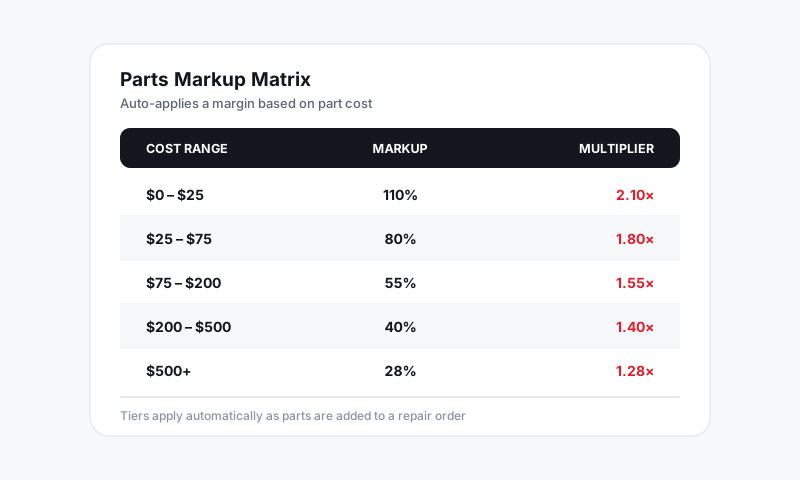
What a markup matrix actually is
A matrix is a table of cost ranges, each with its own markup. As a part lands on a repair order, Pista reads the cost you paid, finds the band that cost falls into, and applies that band's markup to set the sell price. Higher margins on small, low-cost parts; tighter, more competitive margins on big-ticket parts.
A typical matrix looks like this:
| Part cost | Markup |
|---|---|
| $0.00 to $5.00 | 100% |
| $5.01 to $25.00 | 80% |
| $25.01 to $100.00 | 55% |
| $100.01 to $500.00 | 40% |
| $500.01 and up | 28% |
Set up your matrix
- Go to Settings then Pricing and Markups and open Parts Markup Matrix.
- Click Add band and enter a cost range (low and high) plus the markup for that range.
- Repeat until your bands cover every cost from $0 up to "and above."
- Save. New parts added to any RO or estimate now price off the matrix automatically.
Tip: Make your bands cover the full range with no gaps and no overlaps. Pista warns you if a band leaves a hole (say, nothing handles $100.01 to $100.99), because a part that lands in a gap will not get marked up.
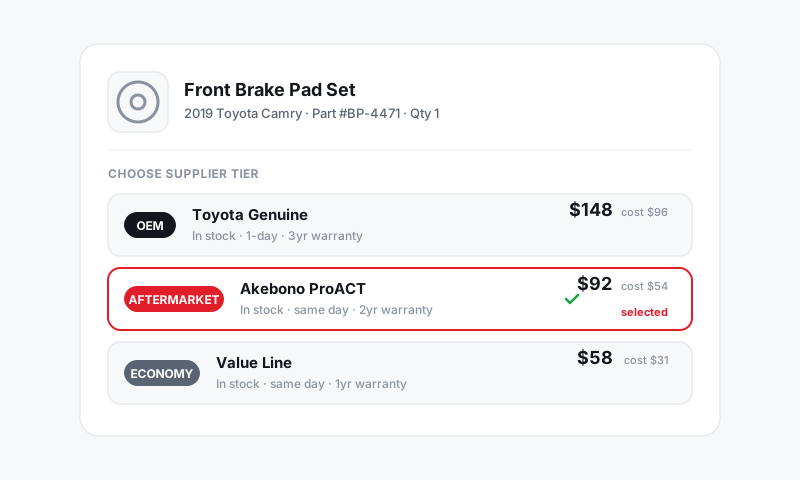
Why banded markups beat one flat number
- Small parts carry their weight. Clips, bulbs, and fittings need a high markup just to be worth stocking and selling.
- Big parts win the quote. A leaner markup on a $1,200 part keeps your estimate competitive while still adding real dollars.
- Margin is consistent. Two service writers building the same job land on the same price, because the matrix decides, not a gut feel.
Good to know
- The matrix sets the default price. A writer can still override the sell price on a single line when a job calls for it.
- Want different rules for tires versus shop supplies versus regular parts? Use part-type matrices so each category prices on its own table. See Auto-applying matrices by part type.
- Confused by markup versus margin? They are not the same number. See Multiplier vs gross profit vs markup percent.
A good matrix is the closest thing to free money in the shop: same parts, same suppliers, better pricing on every ticket.
Still have a question about parts markup matrices explained?
Contact support