Pricing and Markups
Flat-rate parts markup
Apply one simple markup to every part in Pista, and know when a flat rate helps you and when it quietly costs you.
Sometimes you do not want a table of bands; you want one number that marks up every part the same way. That is a flat-rate parts markup. It is the simplest pricing setting in Pista, it gets a new shop running in seconds, and it is the right tool in a few specific situations. It is also the setting most likely to leave money on the table once you grow, so it pays to know both sides.
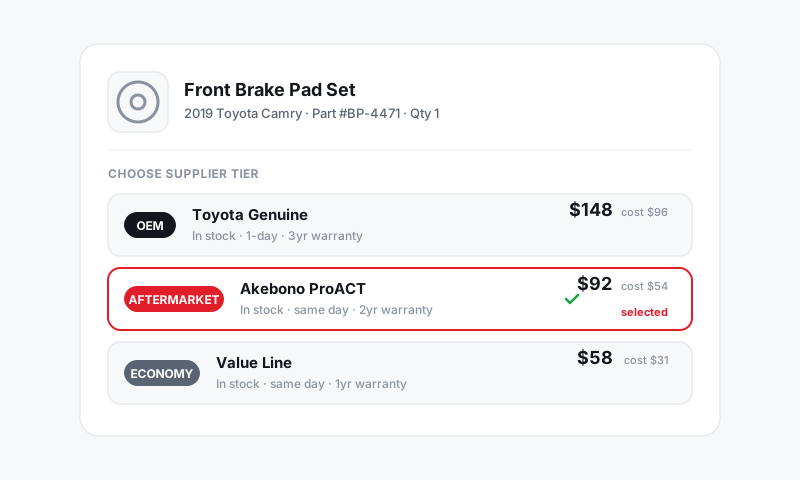
Set a flat parts markup
- Go to Settings then Pricing and Markups.
- Open Parts Pricing and choose Flat rate instead of Matrix.
- Enter your markup (for example, 60%) or switch the display to enter a multiplier or target margin instead. See Multiplier vs gross profit vs markup percent.
- Save. Every part added to an RO or estimate now prices at cost plus that one markup.
When a flat rate is the right call
- You are brand new and want pricing live today, with a matrix to follow once you see your real part mix.
- Your parts are tightly clustered in price, so a single markup happens to fit most of them.
- A specific part type sells best at one fixed markup. Tires are the classic case; many shops run a flat tire markup separate from everything else. See Auto-applying matrices by part type.
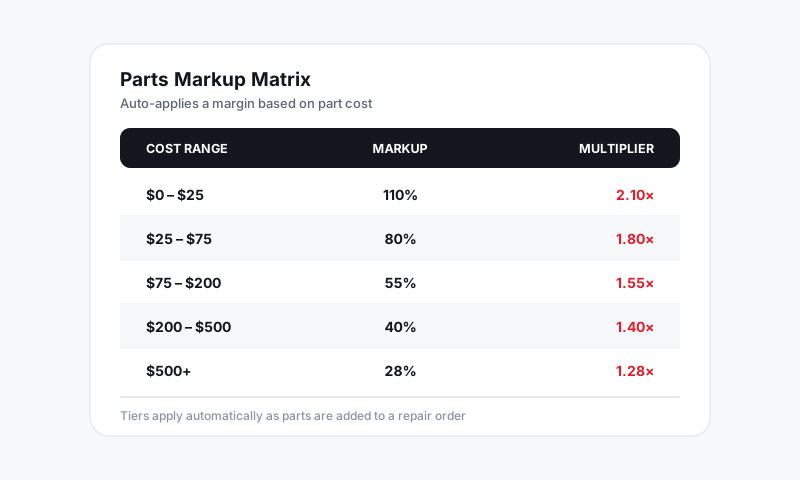
When a flat rate costs you
A single markup cannot be right for both ends of the price range:
- Set it high (say 80%) and your small parts are perfect, but a $900 part becomes $1,620 and you lose the job to the shop down the street.
- Set it low (say 35%) and your big parts stay competitive, but you make $1.40 on a $4 connector that took five minutes to source.
That trade-off is exactly what a banded matrix removes. The moment your tickets span cheap clips and expensive assemblies, a matrix earns more on the same parts. See Parts markup matrices explained.
Tip: Run the flat rate for thirty days, then open your parts gross-profit report. If you see a cluster of low-dollar parts barely making money and high-dollar parts you keep discounting by hand, that is your signal to switch to a matrix.
Good to know
- A flat rate is just a one-band matrix under the hood, so switching to a full matrix later changes nothing about how prices flow onto an RO.
- The flat markup is a default. A writer can still override any single line when a job calls for it.
- Changing the flat rate does not reprice parts already on open or closed ROs. It applies to parts added from that point on.
Start flat if it gets you live faster. Just treat it as a starting line, not a finish line.
Still have a question about flat-rate parts markup?
Contact support