Pricing and Markups
Multiplier vs gross profit vs markup percent
Learn the difference between markup percent, gross profit margin, and a cost multiplier so your pricing math is never off.
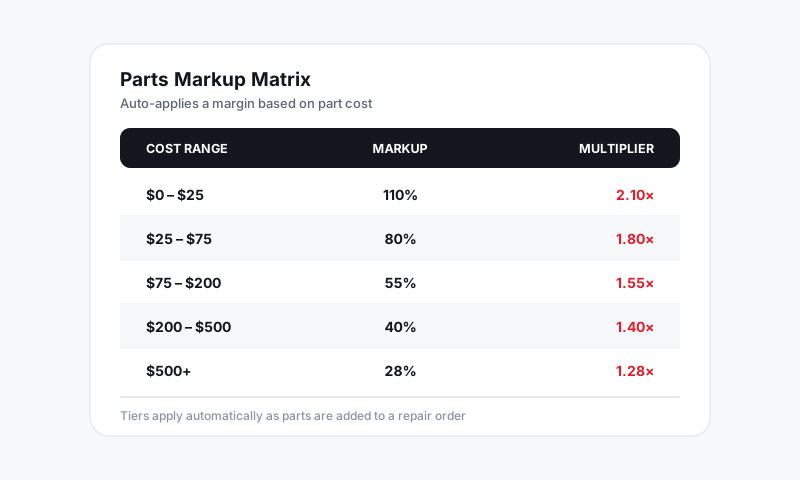
Three numbers describe the same price three different ways, and mixing them up is the most common pricing mistake in any shop. A "40% part" can mean two completely different sell prices depending on whether you mean 40% markup or 40% margin. Pista lets you enter your matrices in whichever style you think in, but you should understand all three so the math is never a surprise.
The three ways to say it
Take a part that cost you $100.
Markup percent
Markup is a percentage of your cost added on top.
- 40% markup means $100 + (40% of $100) = $140 sell price.
- Formula:
sell = cost x (1 + markup).
Gross profit margin
Margin is your profit as a percentage of the sell price, not of cost.
- A $140 sell price on a $100 part is $40 profit on $140, which is a 28.6% margin.
- Formula:
margin = (sell - cost) / sell.
Multiplier
The multiplier is the single number you multiply cost by to get sell. It is the fastest way to think and the hardest to fool.
- A 40% markup is a 1.40 multiplier ($100 x 1.40 = $140).
- Formula:
sell = cost x multiplier.
Why people get burned
Markup and margin are never the same number, and the gap widens as the markup climbs.
| Multiplier | Markup | Margin |
|---|---|---|
| 1.25x | 25% | 20% |
| 1.50x | 50% | 33% |
| 2.00x | 100% | 50% |
| 3.00x | 200% | 67% |
If you want to keep 40% margin, you do not use a 40% markup. You need a 1.67 multiplier, which is a 67% markup. Set the wrong one and you leave roughly a quarter of your profit on the table.
Set your preferred style in Pista
- Go to Settings then Pricing and Markups.
- Open Display preference and choose how matrices show: Markup %, Margin %, or Multiplier.
- Save. Pista converts between them on the fly, so you can type a markup and still read the resulting margin underneath.
Tip: Service writers think in markup; owners and accountants think in margin. Pick the Margin % display if you manage to a target gross profit number, because that is the number your Reports measure you against.
Good to know
- Whatever style you choose, the stored sell price is identical. The display setting only changes the label, not a customer's price.
- A quick gut check: to hit a target margin, the multiplier is
1 / (1 - margin). Want 50% margin?1 / 0.5 = 2.0x.
Once these three click, every matrix in Pista reads the same way, and "40%" stops being ambiguous.
Still have a question about multiplier vs gross profit vs markup percent?
Contact support