Moto AI Service Writer
Writing up inspection findings with Moto
How to turn a technician's inspection notes and photos into clear, customer-ready findings and recommended work using Moto AI.
Writing up inspection findings with Moto
A great inspection only sells work if the customer understands it. Moto AI takes a tech's shorthand notes, photos, and severity ratings and rewrites them into plain language a customer can actually read and approve. This turns the part of the job advisors dread, the write-up, into a few seconds of review.
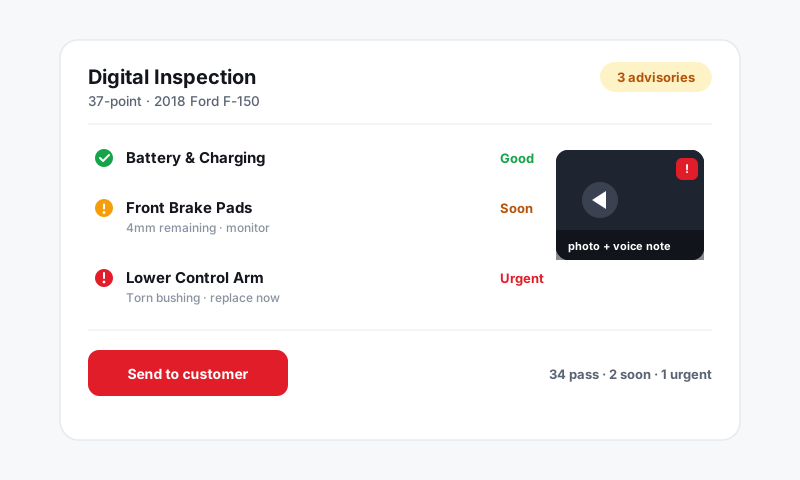
How it fits the inspection flow
- A technician completes a digital inspection, marking each item green, yellow, or red and adding photos, video, or short notes.
- On any flagged item, open Moto AI.
- Moto reads the tech's notes and the severity rating and drafts a clear finding plus a recommendation.
- You review, tweak the wording, and turn approved findings into jobs on the repair order.
What Moto writes for you
For each flagged item, Moto can produce:
- A plain-language finding that explains what is wrong without drowning the customer in jargon.
- A recommendation that says what should be done and why it matters.
- A why-it-matters line tied to safety or further damage, which is what actually drives approvals.
- A draft job with labor and parts, ready to add to the estimate.
So "RF pad 2mm, rotor scored" becomes something a customer reads and trusts, and it arrives with the brake job already drafted.
Turn findings into authorized work
Once you like a write-up:
- Add the finding to the repair order as a job.
- Moto attaches MOTOR labor and parts for the vehicle.
- Send the inspection and estimate to the customer to capture approval by text or email.
Customers can see the photos and the write-up side by side, which makes red and yellow items far easier to approve.
Tip: The tech's note quality still matters. "RF outer pad 2mm, inner 3mm, rotor lip" gives Moto enough to write a precise, credible finding. A bare "brakes bad" gives it less to work with. Encourage techs to note the measurement and the location, even in shorthand.
Keep your shop's voice
Moto's drafts are editable, so adjust the tone to match how your shop talks to customers. Some shops are warm and reassuring, others are blunt and technical. Set the voice you want and your inspections will read consistently no matter which advisor sends them.
Good to know
- Photos and video stay attached to the finding, so the customer sees the evidence, not just the words.
- Severity ratings carry through, so a red item reads with appropriate urgency and a yellow item reads as a heads-up.
- Nothing is sent to the customer until you choose to send it.
To sharpen the write-ups even further, see Tips for accurate AI write-ups.
Still have a question about writing up inspection findings with moto?
Contact support