Moto AI Service Writer
Creating a ticket by conversation
Step-by-step instructions for describing a job to Moto AI and turning your words into a draft repair order.
Creating a ticket by conversation
The fastest way to start a repair order in Pista is to simply tell Moto what is going on. You type or speak the way you would talk to a customer or a tech, and Moto turns it into a structured draft with jobs, labor, and parts. This article walks through it start to finish.
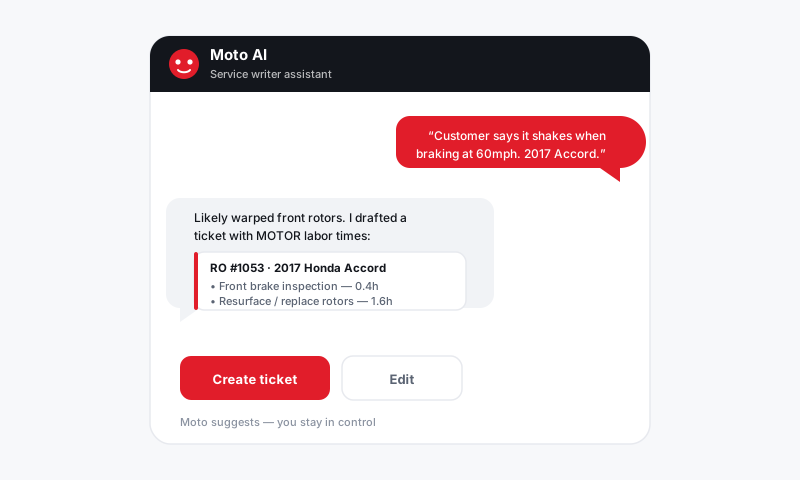
Start a conversation
- From the Job Board or any repair order, open the Moto AI panel.
- Make sure the right vehicle is attached so labor and parts match the correct year, make, and model. (If you have not added a customer or vehicle yet, see Looking up or creating a customer and vehicle.)
- In the message box, describe what the customer wants. Be natural. For example: "Front brakes squealing, customer wants pads and rotors, and an oil change while it's here."
- Press Send. Moto reads your request and builds a draft.
What happens next
Moto breaks your description into separate jobs, then fills each one in:
- It writes a clean concern and recommendation for each job.
- It adds labor with MOTOR times for that exact vehicle.
- It pulls parts from your connected suppliers with live pricing.
- It applies your shop's rates, markups, and tax automatically.
The draft appears right on the repair order so you can see the lines, the totals, and the parts as they would print on an estimate.
Keep refining in plain language
You do not have to get it perfect in one message. Talk to Moto like a coworker:
- "Add a cabin air filter."
- "Use the mid-grade rotors, not the premium ones."
- "Drop the alignment, the customer declined it."
- "Split the brakes into front and rear as separate jobs."
Each follow-up updates the draft in place. Keep going until the ticket reads the way you want.
Tip: Lead with the symptom, not just the part. "Grinding when braking at low speed" gives Moto more to work with than "needs brakes," and it produces a sharper write-up that customers trust.
Speak instead of type
On the mobile app, tap the microphone and dictate the concern. This is built for the lane: a service advisor can walk the car, talk through what they see, and have a draft waiting by the time they are back at the counter. Voice notes become the same structured jobs as typed ones.
Before you send
A conversation gets you to a draft fast, but a draft is not an estimate. Always open the ticket and check it over. See Reviewing what Moto built before you send for exactly what to verify.
Still have a question about creating a ticket by conversation?
Contact support