Reports
Labor and parts profitability
See your real gross profit on labor and parts, read margin versus markup correctly, and find the jobs quietly eating your money.
Revenue tells you how busy you are. Profitability tells you whether being busy is worth it. Pista's profitability report separates your gross profit into labor and parts, the two levers you actually control, and shows margin alongside markup so you stop confusing the two. If you only read one report before payroll, make it this one.
Open the profitability report
- Go to Reports and open the Labor and parts profitability card.
- Set the date range and store.
- Read the gross profit tile and the overall margin percentage at the top.
Read margin versus markup correctly
This trips up good shop owners every week, so be precise:
- Markup is profit as a share of your cost. A $100 part sold at $200 is 100% markup.
- Margin is profit as a share of the sale price. That same part is 50% margin.
- Pista shows both, but margin is the number that ties back to your sales report, so lead with margin when you judge the shop.
Good to know: A 50% margin on parts is a 100% markup, and that gap is exactly why two shops quoting "the same markup" can have very different take-home. When you compare yourself to anyone, confirm which number they mean.
Split labor profit from parts profit
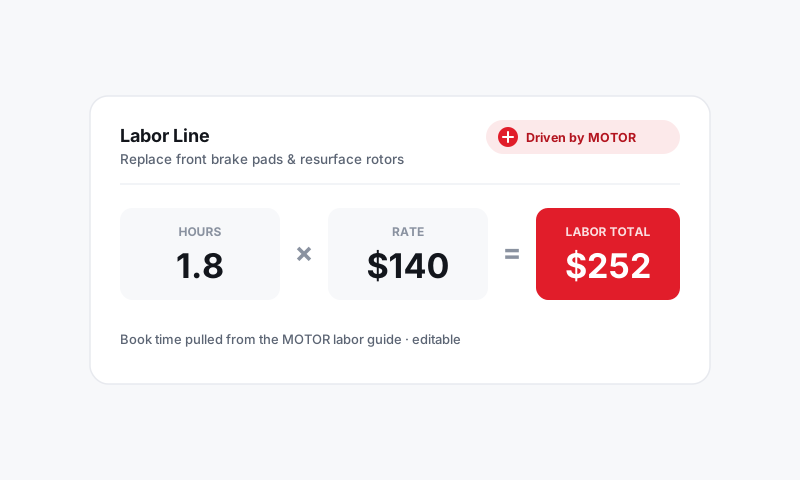
- Scroll to the labor section. Your labor cost is driven by what you pay techs against the hours you billed, so this is really an efficiency story (covered in the technician report).
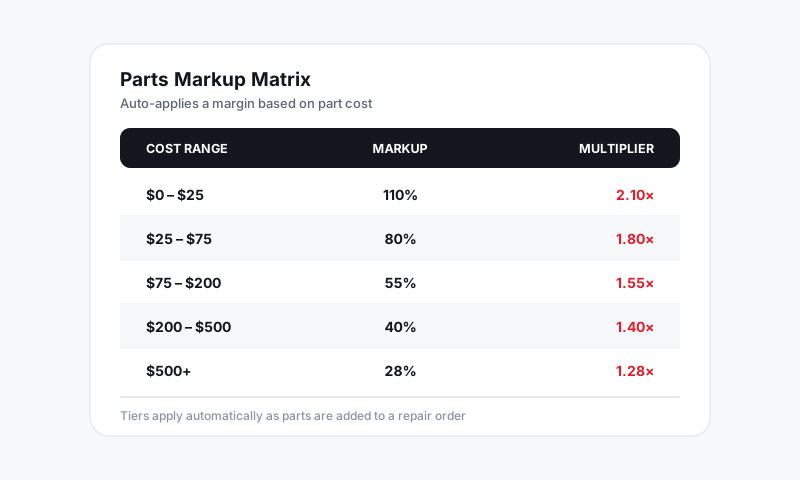
- Scroll to the parts section. This is driven by your markup matrix and what you actually paid your supplier.
- Compare the two margins. Most shops make more reliable money on labor than parts, so a thin labor margin is worth chasing first.
Find the jobs losing money
- Sort the line-item detail by margin, lowest first.
- Look for parts sold at or near cost. That usually means a manual price override or a matrix gap.
- Open the source RO to see whether it was a price match, a comeback, or a missed markup, then fix the matrix so it never repeats.
Tips
- Diagnostic-only jobs carry labor with no part, and that is fine. Do not let them drag down your "parts attach" thinking.
- Watch comebacks. A redone job books labor cost twice against revenue you only collected once, and this report is where that pain shows up.
- If parts margin slips, check whether supplier cost crept up or whether advisors are overriding the matrix. Pista's pricing settings fix the first; coaching fixes the second.
Lead with margin, separate labor from parts, and sort for your worst jobs. That is how you turn a busy month into a profitable one.
Still have a question about labor and parts profitability?
Contact support