Parts and Suppliers
Live vs estimated pricing
Understand when Pista shows real-time supplier cost versus an estimate, and how to keep your parts pricing accurate before you order.
Not every parts price on an RO is the same kind of number. Some are pulled live from a supplier the moment you search. Others are estimates from a manual entry or a saved price. Knowing which is which keeps your margin honest and your invoices defensible.
What live pricing means
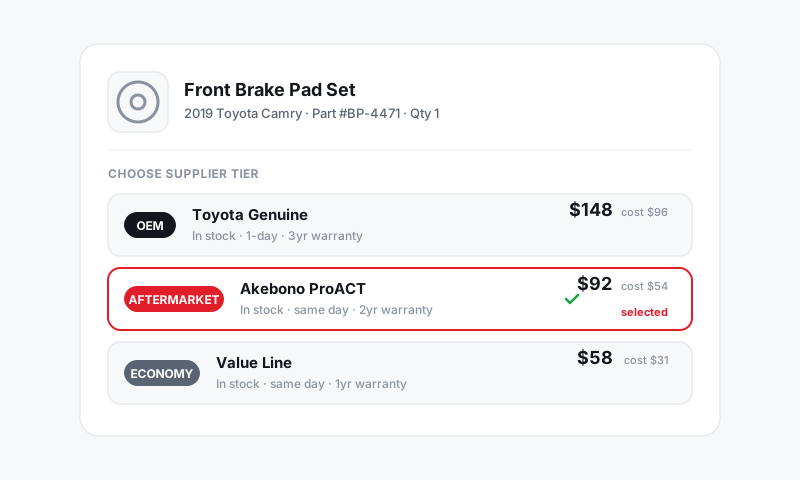
A live price is the real cost and availability returned by a connected supplier at the moment you search. It reflects today's pricing, your account's negotiated rate, and what is actually in stock.
- Live lines are marked as Live on the part so you know the cost is current.
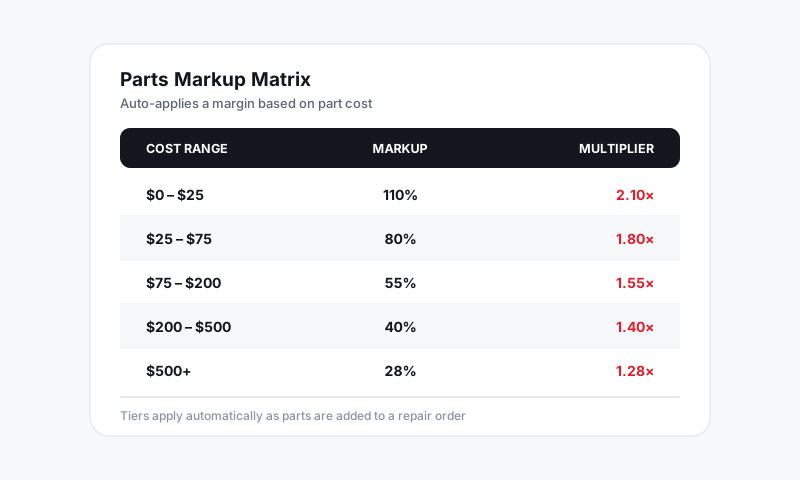
- The sell price is your live cost times your parts markup.
- Availability shows alongside cost, so you are not quoting a part that will not ship in time.
What estimated pricing means
An estimated price is any cost that did not come from a live supplier lookup just now. You will see it when:
- You added the part manually with a typed cost.
- The line is using a last-known or saved price rather than a fresh lookup.
- A supplier connection is offline, so Pista falls back to the most recent figure it has.
Estimated lines are flagged so nobody mistakes a stale number for today's cost.
Good to know: An estimate is fine for getting an approval moving, but confirm the live cost before you actually order. A part price can move between when you quote and when you buy.
Refresh to a live price
- Open the part line on the job.
- Click Refresh price or re-run the part search across your connected suppliers.
- Pista replaces the estimate with the current live cost and recalculates the sell price at your markup.
Do this before you commit a purchase order so what you pay matches what you quoted. See Inventory and Purchasing.
Why a price can change
- Supplier cost updates run constantly. Yesterday's number is not guaranteed today.
- Availability shifts. A part can go from in-stock to backorder, which may route you to a different tier.
- Your account pricing can differ from list, so a manual estimate may be high or low versus your real live cost.
Tips
- Treat a manual cost as a placeholder. Refresh to live before checkout so gross profit on the RO is real, not guessed.
- If a customer approved an estimate and the live cost jumped, that is a moment to re-quote, not eat the difference quietly.
- Locked a custom sell price on a line? A refresh updates the underlying cost but respects your manual price, so check your margin after refreshing. See Adding parts to a ticket.
Still have a question about live vs estimated pricing?
Contact support