Digital Inspections
Turning inspection findings into work
Convert red and yellow inspection findings into estimate jobs with the right parts and MOTOR labor times in a few clicks.
A digital inspection only pays off when its findings become approved, billable work. In Pista, you do not retype anything. You convert a flagged finding into a job on the estimate, and Pista pulls in the labor time and helps you source the parts. This article shows how to go from "front brakes are red" to a priced, sendable job.
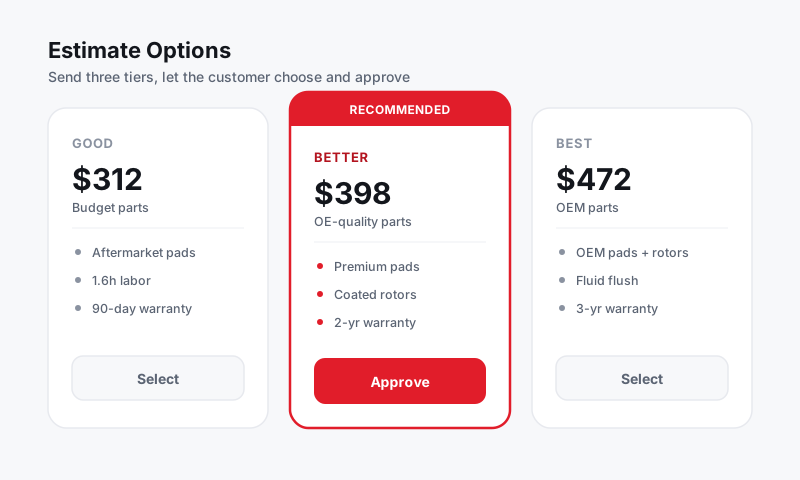
Convert a finding into a job
- Open the completed inspection on the repair order.
- Find a yellow or red item you want to recommend.
- Click Add to estimate on that finding.
- Pista creates a job on the RO and carries over the inspection note and photos so the customer sees the same evidence.
The new job starts with the labor operation matched to the finding. From there you build it out like any other job.
Add labor and parts
Each converted job becomes a normal estimate line, so the full power of the RO is available.
- Confirm the labor operation. Pista pulls the labor time from MOTOR data so the hours are accurate for that exact make, model, and engine.
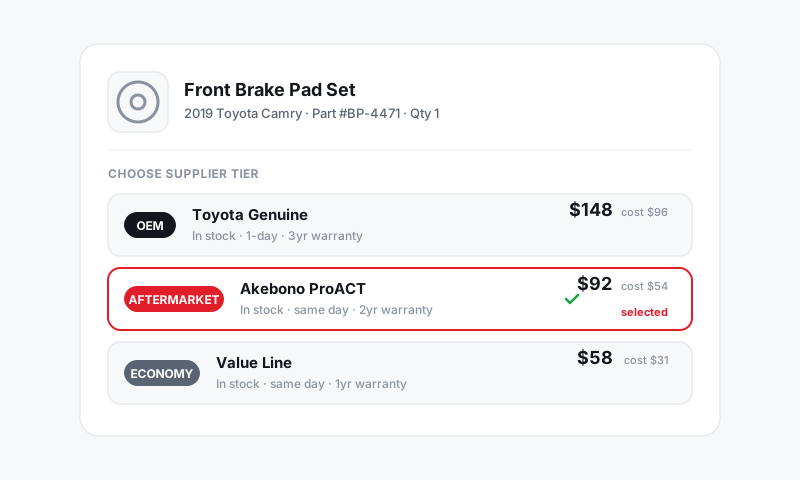
- Add the parts the job needs. Search across your connected suppliers right on the line and compare pricing without leaving the RO. See Parts and Suppliers.
- Check the line total. Your labor rate and parts markup apply automatically. See Pricing and Markups.
Every labor item should carry the part that goes with it, except for pure diagnostics. A brake job with no pads on the line is an estimate waiting to be wrong. Add the part as you build the job, not after.
Let Moto AI do the heavy lifting
The Moto AI service writer can take a finding and draft the whole job for you, including a customer-friendly description, the labor operation, and the parts and labor the work typically needs. You review, adjust, and approve. It turns a five-minute build into a thirty-second one.
Prioritize by severity
Use the colors to structure what you recommend now versus later.
- Convert all red findings first so the must-do work is front and center.
- Add yellow findings as a second tier the customer can plan for.
- On the estimate, group or label the tiers so the customer sees "needed now" separately from "coming soon."
This mirrors how the customer already saw the inspection and makes the approve-or-defer decision easy. See Severity flags.
Send for approval
With the jobs built and priced, send the estimate for authorization.
- Click Send estimate on the RO.
- The customer can approve the whole estimate or pick individual jobs by line.
- Approvals come back timestamped, so you have a clean record of exactly what was authorized. See Estimates and Authorizations.
Good to know
- A finding can wait. If a customer defers a yellow item, it stays on the inspection and in the vehicle history, so you can recommend it again next visit.
- Photos travel with the job, so the customer sees the same proof on the estimate that they saw on the inspection.
- Converting findings is the fastest path from inspection to revenue. Build the habit and your average repair order climbs without any hard selling.
Still have a question about turning inspection findings into work?
Contact support