Digital Inspections
Adding photos and video to an inspection
Attach photos and short videos to inspection findings so customers can see the problem for themselves.
Photos and video are what make a digital inspection convincing. A customer who sees the worn pad or the oil-soaked control arm approves the work far more often than one who only reads "brakes recommended." This article shows how to capture and manage media on an inspection point.
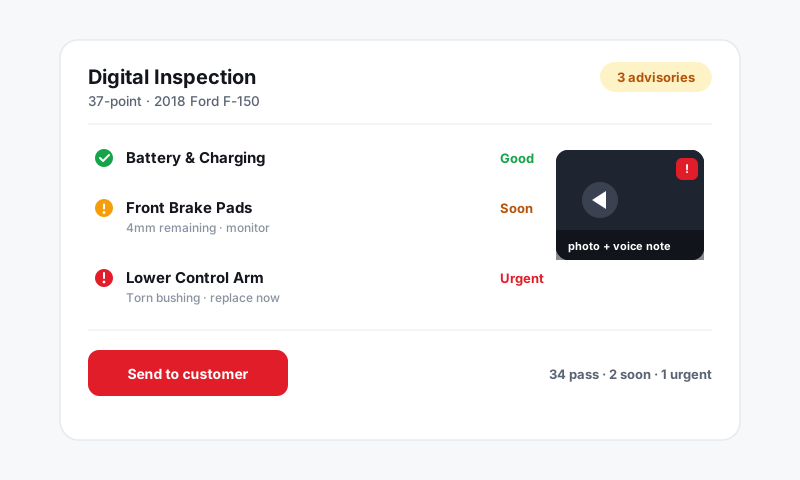
Add media from the mobile app
The fastest way to capture proof is right in the bay with the Pista mobile app.
- Open the inspection and tap the point you are documenting.
- Tap the camera icon.
- Choose Photo or Video, or pick existing shots from your phone's library.
- Take the photo or record the clip, then tap Use to attach it.
Media uploads in the background, so you can keep moving down the checklist while it syncs.
Add media on the desktop
At the front counter you can attach files to any inspection point.
- Open the inspection on the repair order.
- Click the point you want to add to.
- Click Add media and drag in a file or browse to it.
This is handy when a customer emails you a photo, or when you want to add a reference image to a finding.
Record a video walkaround
A 15 to 30 second video does more than a still photo for things a customer cannot easily picture, like a clunk on a control arm or a leak that only shows under pressure.
- Tap the video option on the inspection point.
- Narrate as you record so the customer hears the reason in plain language.
- Keep it short. Long clips take longer to upload and lose the customer's attention.
Tip: Talk to the customer, not the tech. "This is the leak we found coming from your water pump" lands better than "P0118 coolant temp circuit high."
Organize and clean up
Before you send the inspection, make sure the media tells a clear story.
- Drag thumbnails to reorder them so the clearest shot is first.
- Tap a photo and choose Delete to remove blurry or duplicate shots.
- Attach the good side too. A photo of the healthy rear pads next to the worn fronts makes the contrast obvious.
Good to know
- Photos and video stay attached to the inspection for the life of the repair order, so they are part of the vehicle's permanent history.
- When you send an inspection, the customer views every attached photo and video in their browser, no app required. See Sending an inspection to a customer.
- Shoot in good light and get close. A clear photo of a 3mm pad is worth more than any amount of text.
Still have a question about adding photos and video to an inspection?
Contact support