Estimates and Authorizations
Good, Better, Best tiers
Give customers a choice of repair options so price becomes a decision instead of a roadblock.
When a customer hears one big number, they hesitate. When they see three priced options, they choose. Good / Better / Best tiers let you quote the same repair at different part grades and scopes, so the conversation shifts from "yes or no" to "which one." This is one of the simplest ways to lift your average ticket without pressure selling.
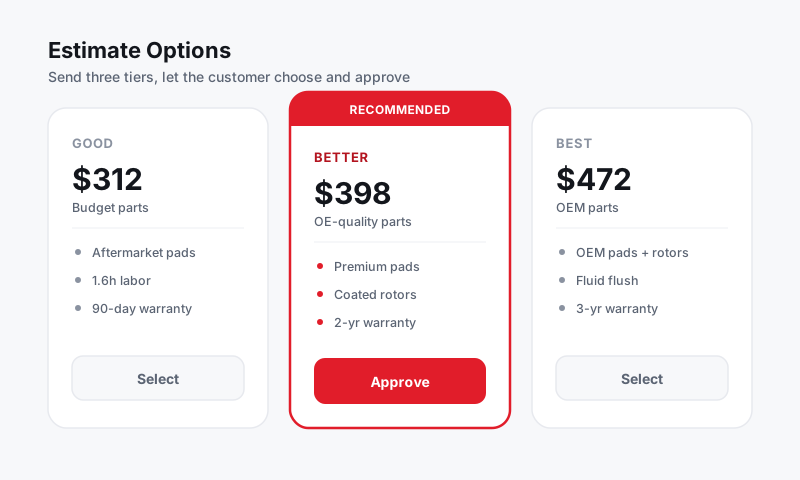
How tiers work in Pista
A tiered job presents the same repair in up to three columns:
- Good keeps the car safe and on the road, usually with budget or quality aftermarket parts.
- Better is the balanced choice, often premium aftermarket with a stronger warranty.
- Best is the no-compromise option, typically OEM parts and any related maintenance done at the same time.
Pista's parts engine sources across OEM, aftermarket, and budget tiers, so the price gaps between columns are real, not made up. See Parts and Suppliers.
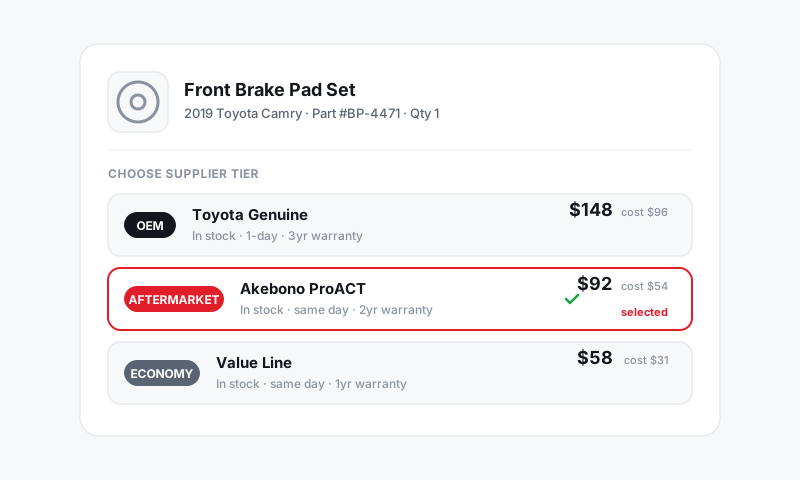
Build a tiered job
- On the repair order, add a job as usual.
- Click Offer options (or the tiers icon) on the job.
- Pista creates Good, Better, and Best columns. You can rename or remove any column.
- For each column, set the parts grade and adjust labor if the scope differs (for example, Best adds a coolant flush).
- Review each column's subtotal in the job panel.
Recommend a tier
- Mark one column as Recommended so the customer sees your professional pick.
- Add a short note explaining the difference, such as "Better includes a 3-year warranty."
- Send the estimate. The customer picks one tier, and approving it stages exactly those parts and labor onto the RO. See Sending an estimate for approval.
Good to know: Whichever tier the customer approves becomes the authorized work. The other columns drop away cleanly, so your RO totals and parts orders reflect only what they chose.
Tips that make tiers convert
- Always present three. Two options feel like a trap; three feel like a real choice. Most customers land in the middle.
- Make Better genuinely better. If the only difference is price, customers default to Good. Bundle a longer warranty or a related item into Better.
- Reserve tiers for jobs that warrant them. Brakes, suspension, cooling, and timing components are great fits. An oil change does not need three columns.
- Let the part grade tell the story. Naming the actual brand or OEM source builds trust faster than the word "premium."
What is next
Tiered estimates flow into the same approval and authorization path as any estimate. Continue to Customer e-signature authorization and Handling approved vs declined work.
Still have a question about good, better, best tiers?
Contact support