Messaging and Inbox
Two-way texting with customers
Send and receive real text messages with customers from Pista, with replies landing right back in the shop instead of on a personal phone.
Two-way texting with customers
Customers do not answer the phone anymore, but they read texts in minutes. Pista gives every shop a real, two-way texting line so you can send an update and the customer can text back, all from inside the platform. No personal cell numbers, no group thread chaos, and every word saved against the customer and the repair order.
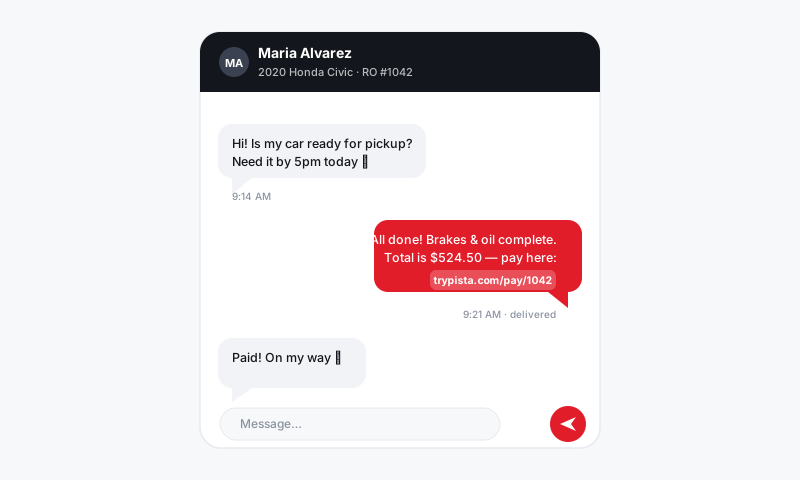
How shop texting works in Pista
Your shop texts from a dedicated business number, not an advisor's phone. When you message a customer, it sends as a normal SMS. When they reply, it comes straight back into Pista and pings whoever is watching the inbox. Because it is tied to the customer record, the next person who opens the ticket sees the whole back-and-forth.
Send your first text
- Open the repair order or the customer profile for the person you want to reach.
- Click Message, then choose Text as the channel.
- Type your message, or pick a message template and let Pista fill in the name, vehicle, and balance.
- Click Send. The text leaves from your shop number and the thread updates instantly.
To attach an estimate, inspection, or pay link, drop it into the message and Pista turns it into a short, tappable link the customer can open on their phone.
Read and reply
- When a customer replies, the thread shows a new-message badge and notifies the assigned advisor.
- Open the thread from the RO, the customer profile, or the unified Message Center.
- Type your reply and send. The customer sees one clean conversation, not a different number each time.
Good to know
- One number, one thread. Every advisor texts from the same shop line, so the customer never gets confused about who they are talking to.
- It follows the customer, not the device. If the advisor who started the conversation goes home, the next person picks it up with full context.
- Compliance matters. A customer who replies STOP is opted out automatically and Pista blocks further texts to that number until they opt back in. Keep messages relevant to their vehicle and service.
- Photos go both ways. Customers can text you a picture of a warning light or a leak, and it lands in the thread for your tech to see.
Tips
- Lead with the shop name on first contact: "Hi Maria, this is Pista Auto about your Civic." People ignore texts from numbers they do not recognize.
- Keep it short. A two-line text with a link beats a paragraph every time.
- Texting is for quick, time-sensitive updates. For anything long or formal, like a full estimate breakdown, send by email so it is easy to read and keep.
Two-way texting is the single fastest way to cut approval times and keep cars moving. Once customers know they can just text the shop back, you stop playing phone tag and start closing work the same day.
Still have a question about two-way texting with customers?
Contact support