Messaging and Inbox
The unified Inbox / Message Center
See every text and email with every customer in one shared inbox so nothing slips through and anyone on the team can pick up a conversation.
The unified Inbox / Message Center
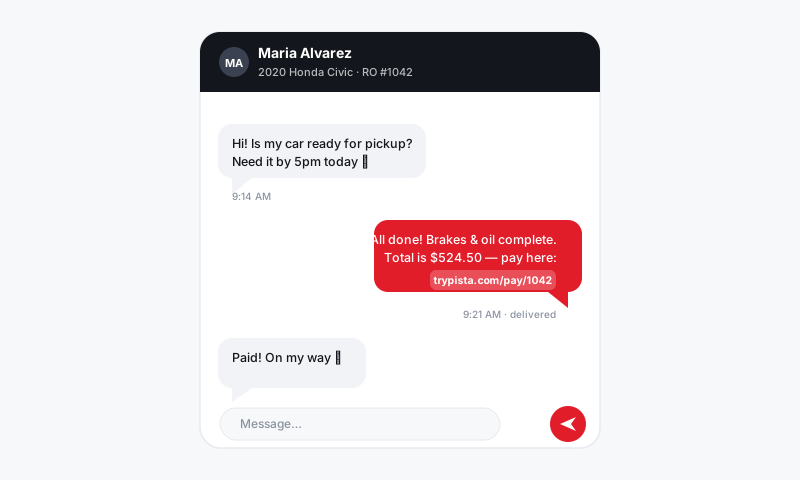
Conversations get lost when they live in five places: one advisor's phone, a sticky note, a personal email, the desk line voicemail. The Pista Message Center pulls every text and email your shop sends or receives into one shared inbox, organized by customer and tied to the right repair order. Open it once in the morning and you can see exactly who is waiting on you.
What lands in the inbox
The Message Center collects:
- Texts sent and received on your shop line.
- Emails to and from customers, including estimates and invoices.
- Replies to automated updates, like a customer answering an approval request.
- System touchpoints such as status updates, so you have a full timeline.
Everything is threaded by customer, and each thread links back to the vehicle and repair order it belongs to.
Work the inbox
- Open the Message Center from the main navigation.
- Use the views to focus: Unread, Needs reply, Assigned to me, or All.
- Click a conversation to open the full thread on the right.
- Read the latest message, then reply by text or email right from the same panel.
- When you are done, the thread drops out of Needs reply so your queue only shows live work.
Filter, search, and assign
- Search by customer name, phone, vehicle, or RO number to jump straight to a conversation.
- Filter by channel to see only texts or only emails when you are catching up.
- Assign a thread to a specific advisor so it is clear who owns the reply, especially in a multi-advisor shop.
- Filter by store if you run more than one location and want only your branch's messages.
Good to know
- It is shared, not personal. Any advisor with access sees the same threads, so coverage does not break when someone is at lunch or off for the day.
- Context travels with the message. From any thread you can open the linked RO, see the balance, and check the inspection without leaving the inbox.
- Read receipts on the queue. A thread is not "handled" until someone clears it, so a busy Monday does not bury a customer who asked a question Saturday.
Tips
- Make clearing Needs reply a daily close-out habit. An empty queue at the end of the day means no customer is sitting unanswered overnight.
- Assign threads as soon as they come in so two advisors are not typing replies to the same person.
- If a conversation is about active work, reply from the repair order instead so the message and the ticket stay side by side. It is the same inbox either way.
The Message Center is mission control for customer communication. When every conversation lives in one place that the whole team can see, follow-ups stop falling through the cracks and your customers feel like the shop is actually paying attention.
Still have a question about the unified inbox / message center?
Contact support