Messaging and Inbox
Automatic status update texts
Set Pista to text customers automatically as their car moves across the job board so they always know where things stand without you lifting a finger.
Automatic status update texts
The number one customer complaint about auto repair is silence. They drop the car off and hear nothing for hours. Pista fixes that on autopilot: as a vehicle moves across the job board, the customer gets a friendly text letting them know what is happening. No advisor has to remember to send it, and the messages carry the Moto personality so they feel human.
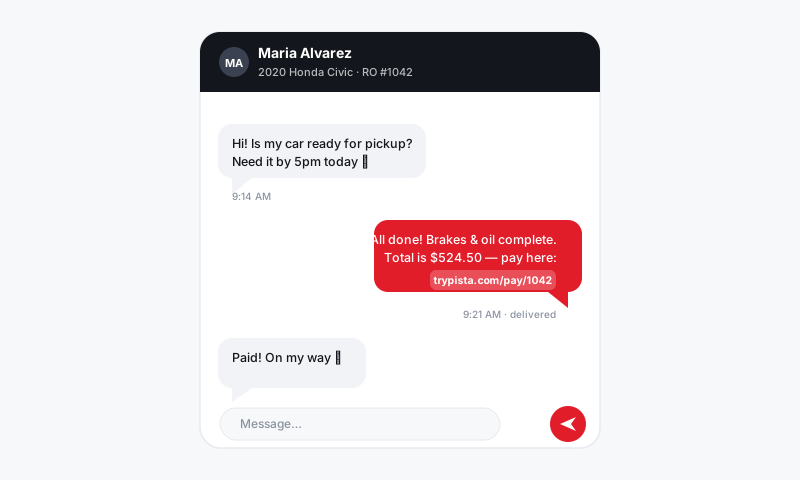
How automatic updates work
You map a message to each stage of your workflow. When a tech or advisor drags a car into that stage, Pista sends the matching text to the customer. Move the car to In Progress, the customer hears the work started. Move it to Ready for Pickup, they get told to come grab it. The board is already part of your day, so the updates happen as a side effect of normal work.
Turn on status updates
- Go to Settings, then Messaging or Workflow Notifications.
- For each job-board stage, decide whether it should send a customer text.
- Pick or edit the message for that stage. Start from a template and use placeholders for name and vehicle.
- Set quiet hours so updates never fire in the middle of the night.
- Save. From now on, moving a car triggers the message automatically.
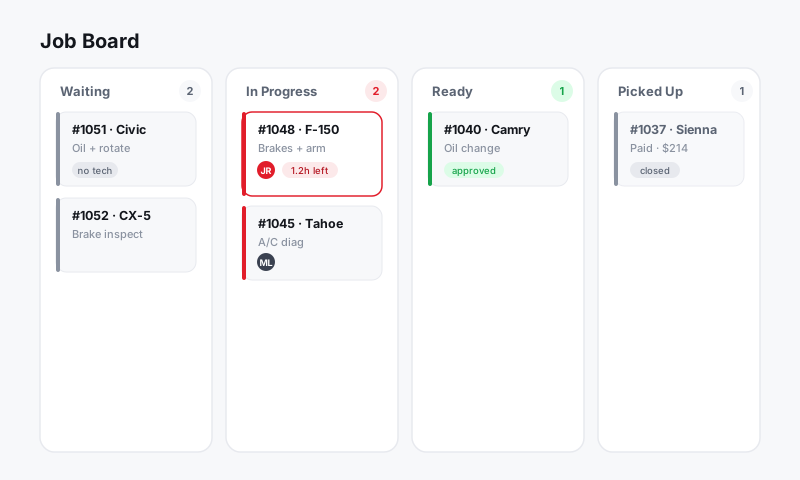
Stages worth automating
- Checked in: confirm you have the car and will follow up with a plan.
- In progress: let them know work has started.
- Waiting on parts or approval: set expectations when there is a delay.
- Ready for pickup: the message that actually gets them off the couch.
Good to know
- It still feels personal. Each text fills in the customer's name and vehicle and carries the friendly Moto tone, so it never reads like a system alert.
- Replies come back to you. When a customer answers a status text, it lands in the Message Center as a normal thread an advisor can pick up.
- You stay in control. You choose which stages send messages. Skip the internal ones and only notify on the moments that matter to the customer.
- No double-texting. Pista sends a stage's message when the car enters it, not every time the board reshuffles.
Tips
- Do not over-message. Three or four well-placed updates beat a text for every micro-step. People want signal, not noise.
- Make the Ready for Pickup message your strongest: clear, warm, and including your hours and what they owe.
- Pair automatic updates with two-way texting. The customer can reply to any update and you are already in a live conversation.
Automatic status texts are the cheapest customer-experience upgrade you can make. The work is already moving across your board, so let it tell the customer's story for you and watch the "any news?" calls disappear.
Still have a question about automatic status update texts?
Contact support