Integrations
Phone and VoIP
Connect your shop phone line to Pista so calls ring in with caller context, route to the right store, and log to the customer automatically.
Phone and VoIP
The phone is still where most repair orders start, so it should not live in a different world than the rest of your shop. Pista's phone integration brings your line into the platform: incoming calls show you who is calling and their vehicle history before you pick up, calls route to the right store, and every call logs to the customer record without anyone typing a note. This article covers connecting your number and getting the most out of it.
What the phone integration gives you
- Caller context on the screen. When a known customer calls, Pista surfaces their profile, vehicles, and open ROs before you say hello.
- Smart routing. Send calls to the right store and the right counter so customers reach the people who can help.
- Automatic call logging. Each call attaches to the customer record, so history is complete without manual entry.
- Click-to-call. Dial a customer straight from their profile or a repair order.
Connect your phone line
- Open Shop Settings, then Phone.
- Click Connect and choose to port your existing number or provision a new VoIP number.
- Enter your VoIP credentials if you are bringing your own provider, or follow the prompts to set up a Pista-managed line.
- Pista validates the connection and your line goes live.
Good to know: Porting an existing number keeps the phone number your customers already know. It can take a little longer than provisioning a fresh number, so plan the switch for a slower day if you can.
Route calls to the right store
If you run more than one location, set routing so each number reaches the right counter.
- In Phone settings, open Routing.
- Assign each number to a store, like Wynwood or Doral.
- Set business-hours and after-hours behavior so calls go to voicemail or a forwarding number when the bay is closed.
Use it day to day
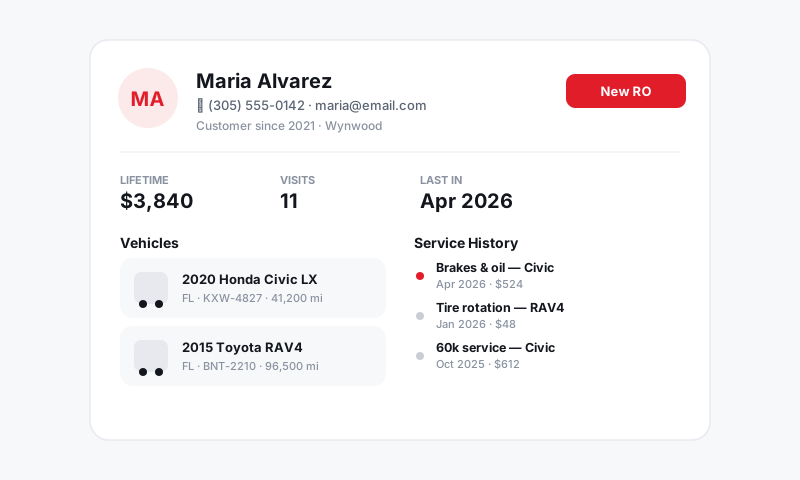
- When the phone rings, check the caller card for the customer and their vehicles.
- Answer, help, and the call logs to their record automatically.
- To call out, hit click-to-call from any customer or RO.
Tips
- Confirm after-hours routing before you rely on it. A test call after closing tells you instantly whether voicemail or forwarding is set the way you think.
- Lean on caller context at the counter. Knowing the customer and their last visit before you pick up turns a cold call into a warm one.
- Pair phone with your unified inbox so calls, texts, and email all live next to the customer. See Messaging and Inbox and Customers and CRM.
Still have a question about phone and voip?
Contact support