FAQs and Troubleshooting
My reports or numbers don't match what I expected
How to reconcile a report total that looks wrong by checking date range, store, and which repair orders are included.
My reports or numbers don't match what I expected
When a report total doesn't match the number in your head, the report is almost always counting a different set of repair orders than you are. Reports in Pista are precise about what they include, so the gap is usually a date range, a store filter, or whether an RO is finished and paid. Here is how to close it.
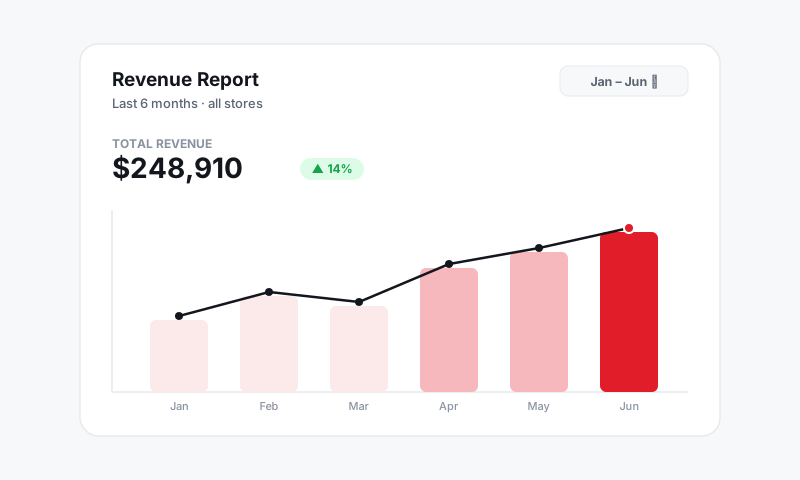
Step 1: Check the date range
This is the number-one reason reports surprise owners.
- Open the report and look at the date range at the top.
- Confirm it's the period you mean: today, this week, this month, or a custom span.
- Watch the edges. A job that closed at 6 PM may fall into a different day than you assume depending on how the range is set.
Step 2: Check the store filter
- If you run more than one location, confirm whether the report shows one store or all of them.
- Switch the store filter and watch the totals move; that tells you immediately if revenue is sitting under the other location.
Step 3: Check which ROs are counted
Reports distinguish between work in progress and money actually earned.
- Confirm whether the report counts completed ROs, paid ROs, or all open work. These produce very different totals.
- An estimate that was never approved should not show as revenue. If it does, check that it wasn't accidentally converted to an RO.
- A finished job that hasn't been paid yet may show in one column and not another. That's expected, not a bug.
Good to know: "Sales" and "collected" are not the same number. You can have completed work that hasn't been paid, and payments collected on work from a prior period. A report that splits them is doing its job, even when the two don't match.
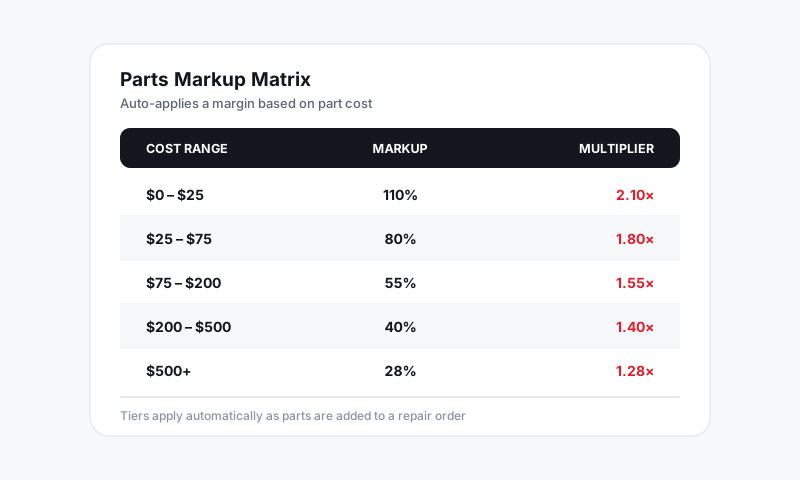
Step 4: Reconcile parts and labor margin
If your profit looks off rather than your revenue, the inputs are the place to look.
- Confirm part costs on the relevant ROs are accurate; a stale cost inflates or deflates margin.
- Confirm the right markup tier applied. OEM, aftermarket, and budget parts carry different markups.
- For a deeper dive on how a single line is priced, see Why a price or labor time looks off.
Step 5: Refresh before you conclude
If you've been editing ROs while a report is open, refresh the page so it recalculates against the latest data before you trust the total.
Tips
- Match the filters to the question. "How much did we collect this week" and "how much work did we complete this week" are different filters and different numbers.
- Owner-level access required. If totals are hidden entirely, your role may not include financials. An admin can adjust that under Shop Settings → Team.
- Compare apples to apples. When checking Pista against another system, set both to the exact same date range and store first.
Still doesn't reconcile?
If the same date range, store, and status filters still don't add up, see Getting more help and tell us the report, the filters you used, and the number you expected.
Still have a question about my reports or numbers don't match what i expected?
Contact support