Customers and CRM
Managing customer vehicles and history
Add vehicles to a customer by VIN or plate, keep mileage and details current, and manage multiple cars under one profile.
Managing customer vehicles and history
Most of your customers have more than one car, and a good fleet account has dozens. Pista keeps every vehicle tied to its owner so labor times decode correctly, recalls surface, and you can pull up the full story on any car in seconds. This article covers adding and managing the vehicles on a customer profile.
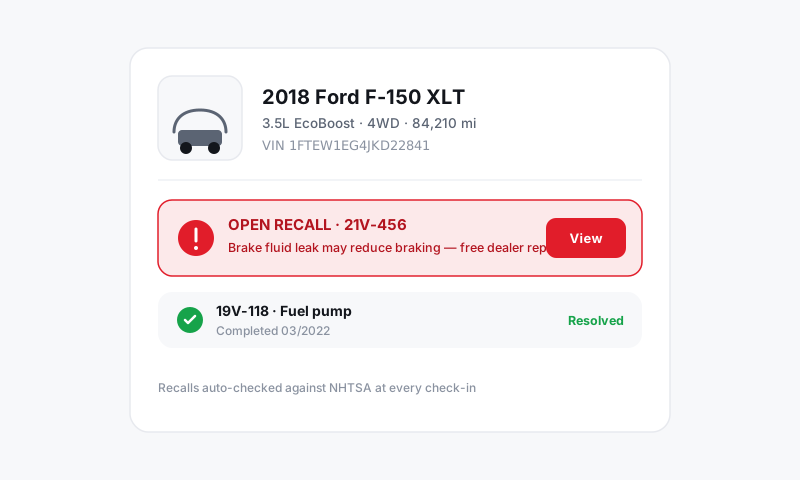
Add a vehicle
The fastest, most accurate way to add a car is by VIN, because the decode locks in the exact engine and trim, which is what drives accurate MOTOR labor times.
- Open the customer and click Add vehicle.
- Enter the VIN and let Pista decode the year, make, model, engine, and trim.
- No VIN handy? Enter the license plate and state, or pick year, make, and model by hand.
- Add the current mileage and license plate so service intervals and recall lookups work.
- Click Save.
Tip: Scan the VIN with the Pista mobile app at the door using the camera. It beats keying in 17 characters and avoids the classic typo that breaks labor lookups.
Why the VIN decode matters
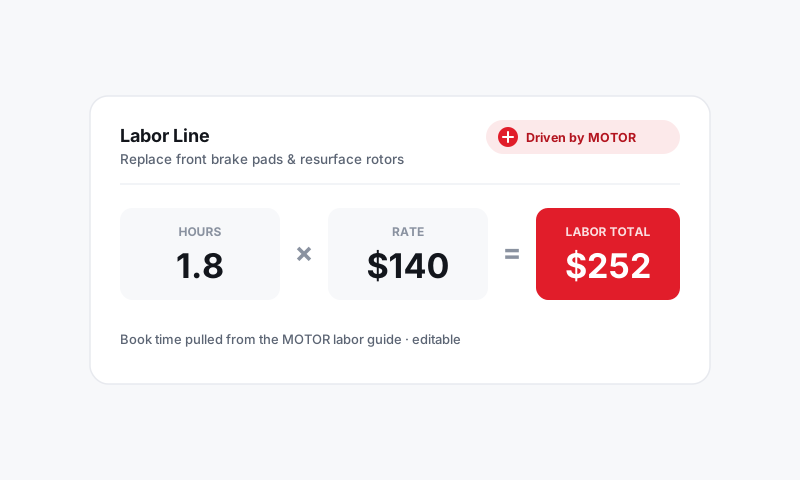
Labor times in Pista are Driven by MOTOR, and MOTOR times are keyed to the exact engine on the car. A correctly decoded VIN means a brake job quotes the right hours for that specific drivetrain instead of a generic average. A bad or missing VIN is the number one reason labor times look off. See Labor and MOTOR Data.
Manage multiple vehicles
When a customer owns several cars, each one lives as its own vehicle card on the profile.
- Open the customer to see all vehicles listed together.
- Click any vehicle to view its details, service history, and open recommendations.
- When you start an RO, pick which vehicle the work is for so history files under the right car.
For commercial and fleet accounts, this is how you keep ten trucks straight under one billing name. Each truck carries its own mileage, history, and declined work.
Keep details current
- Update mileage every visit. Pista uses it to time service reminders and flag mileage-based maintenance. The fastest path is to capture it at check-in.
- Fix the plate when a customer re-tags or transfers a car.
- Retire a vehicle the customer no longer owns so it stops cluttering new ROs. The past history stays on the profile.
See the full vehicle history
Click into any vehicle to see every repair order it has been through, the parts and labor on each, and the work that was declined. This is gold at the counter: you can tell a customer exactly when their last brake service was, what you recommended last time, and what is due now. For a deeper walkthrough of reading and using that timeline, see Service history.
Good to know: Open recalls show on the vehicle when the VIN is decoded. Mentioning an open recall is an easy trust builder and a reason for the customer to come back. See Vehicles, VIN and Recalls.
Still have a question about managing customer vehicles and history?
Contact support